How to Count Page Views on Your Website (3 Ways)
You open two reports and see two different page view numbers. Neither one is lying. They just count different things.
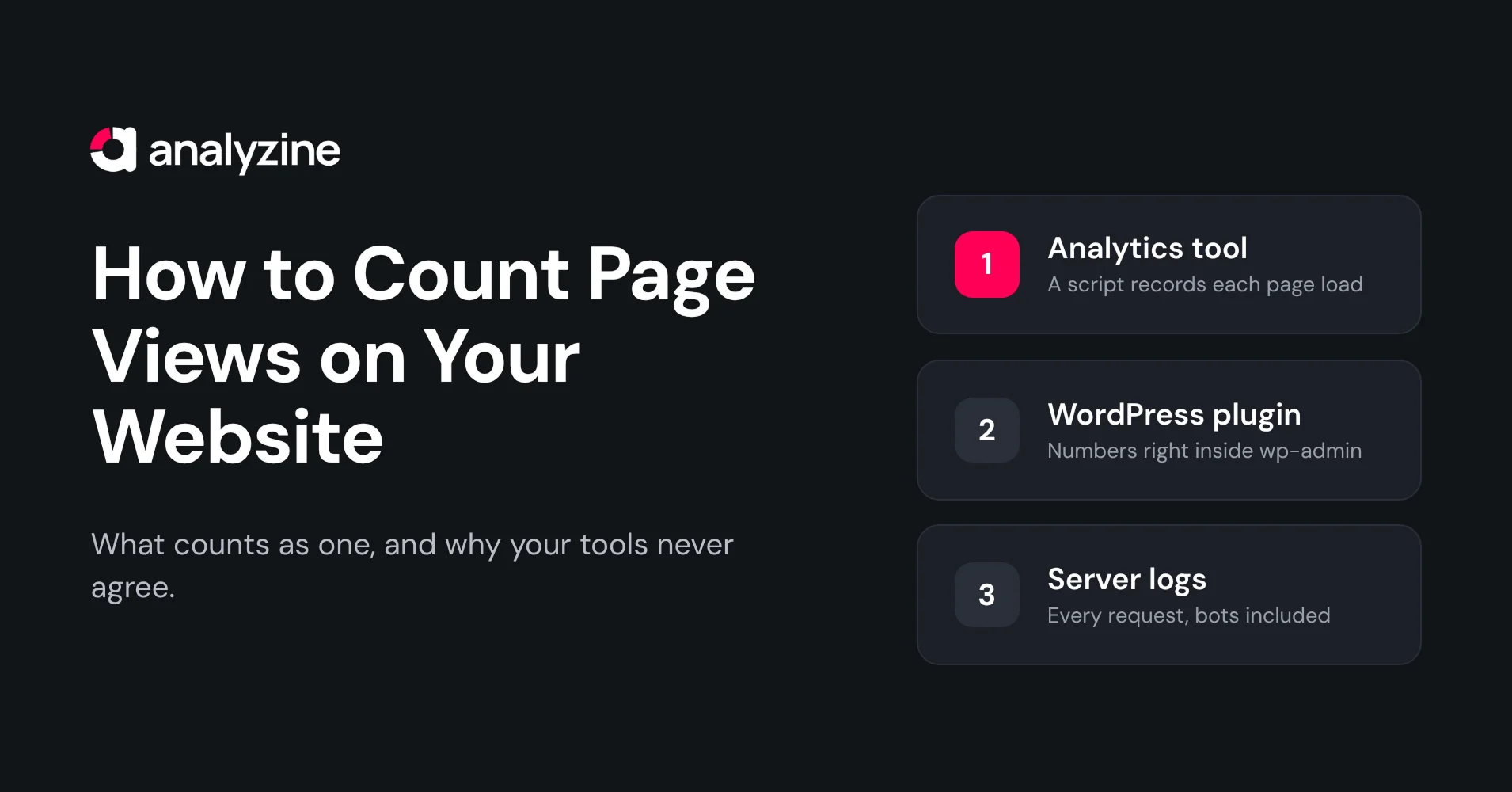
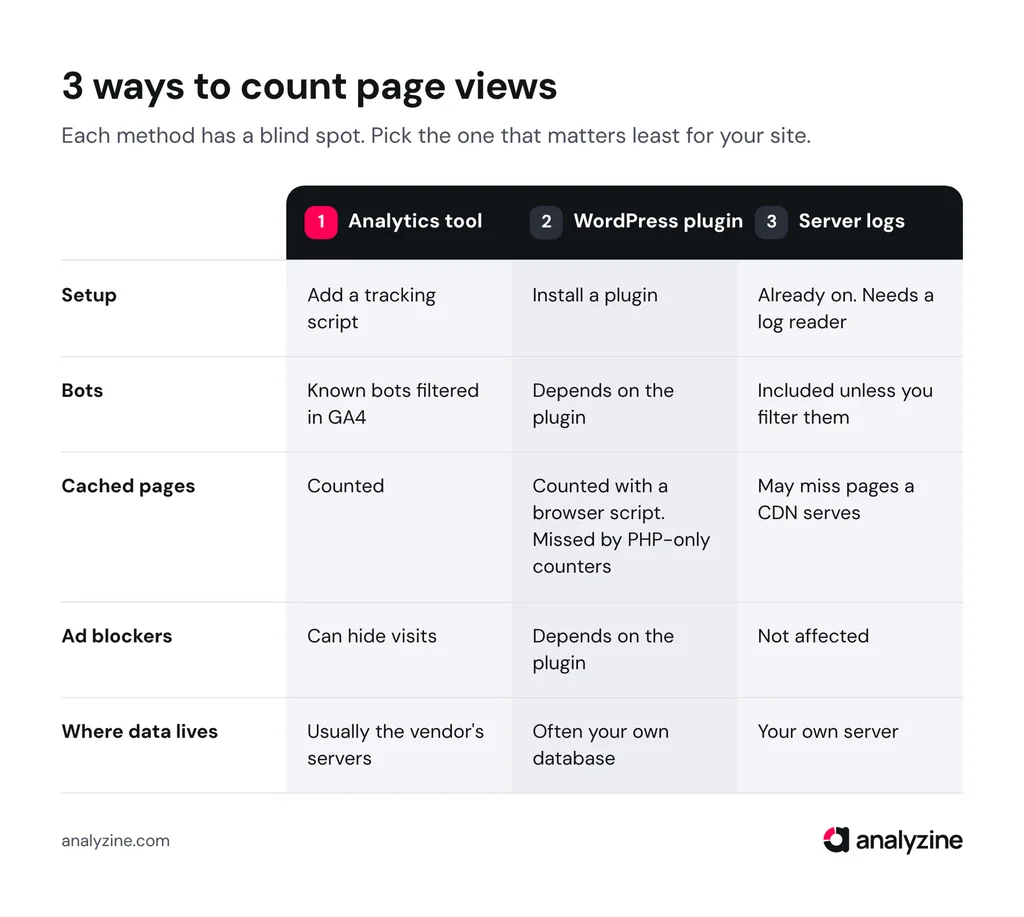
To count page views on your website, you need a tool that records each time a browser loads one of your pages. There are 3 ways to do it: an analytics tool, a WordPress plugin or your server logs. Each one counts a little differently, so the real skill is knowing what yours includes.
This guide is for WordPress site owners who want numbers they can trust. You’ll learn what counts as a page view, how to count page views 3 ways, and why your tools never quite agree.
Key takeaways
- A page view is one load of one page, recorded by a tracking tool. Reloads usually count.
- You can count page views with an analytics tool, a WordPress plugin or your server logs.
- Tools disagree because of ad blockers, consent choices, bot filtering, caching and time zones.
- Page views show what people read. Pair them with conversions to see what people read before they buy.
In this guide
- What is a page view?
- What counts as a page view (and what doesn’t)
- Page views vs visits vs unique visitors
- How to count page views: 3 ways
- Why your page view numbers don’t match
- How many page views does a website get?
- Page view analysis: what to do with the number
- FAQ
What is a page view?
A page view is one load of a web page, recorded by an analytics tool. If someone opens your pricing page, that’s 1 page view. If they read 4 different pages in one visit, that’s 4 page views.
Page views measure how much of your content gets seen. They don’t tell you how many people saw it. One keen reader can create 20 page views on their own.
Page view or pageview?
Both spellings are correct. Universal Analytics, the older version of Google Analytics, called the metric “Pageviews,” so the one-word version stuck. Google Analytics 4 now simply calls it “Views.”
What counts as a page view (and what doesn’t)
Here’s the part most guides skip. Every tool sets its own rules, and those rules explain most of the gaps between your reports.
| What happened | Does it count as a page view? |
|---|---|
| The visitor reloads the page | Usually yes. Google Analytics 4 counts every page load. |
| The page comes from a cache | Yes for tools that run in the browser. No for counters that only run in PHP. |
| The visitor moves between screens in an app-style site | Yes in GA4 when the site changes the browser history. Other tools vary. |
| The visitor clicks the back button | Depends on the tool and the browser. |
| A search engine bot visits | Usually no. GA4 removes known bots. Server logs keep them. |
| You or your team browse the site | Yes, unless you exclude yourselves. |
| The visitor uses an ad blocker | Often no. Many ad blockers stop common tracking scripts. |
| The visitor declines cookies | Depends on your tool and your consent setup. |
Google says its tag sends a page view “whenever someone loads a page of your website or their browser history state is changed by the active site” (Google for Developers). That’s why both reloads and app-style navigation count in GA4.
Page views vs visits vs unique visitors
These three numbers get mixed up all the time. Here’s the short version.
| Metric | What it counts | The question it answers |
|---|---|---|
| Page views | Every page load | How much content got seen? |
| Visits (sessions) | Each separate trip to your site | How often do people come? |
| Unique visitors | The different people, or browsers, behind those visits | How many people came? |
| Pages per visit | Page views divided by visits | How deep do people read? |
A quick example
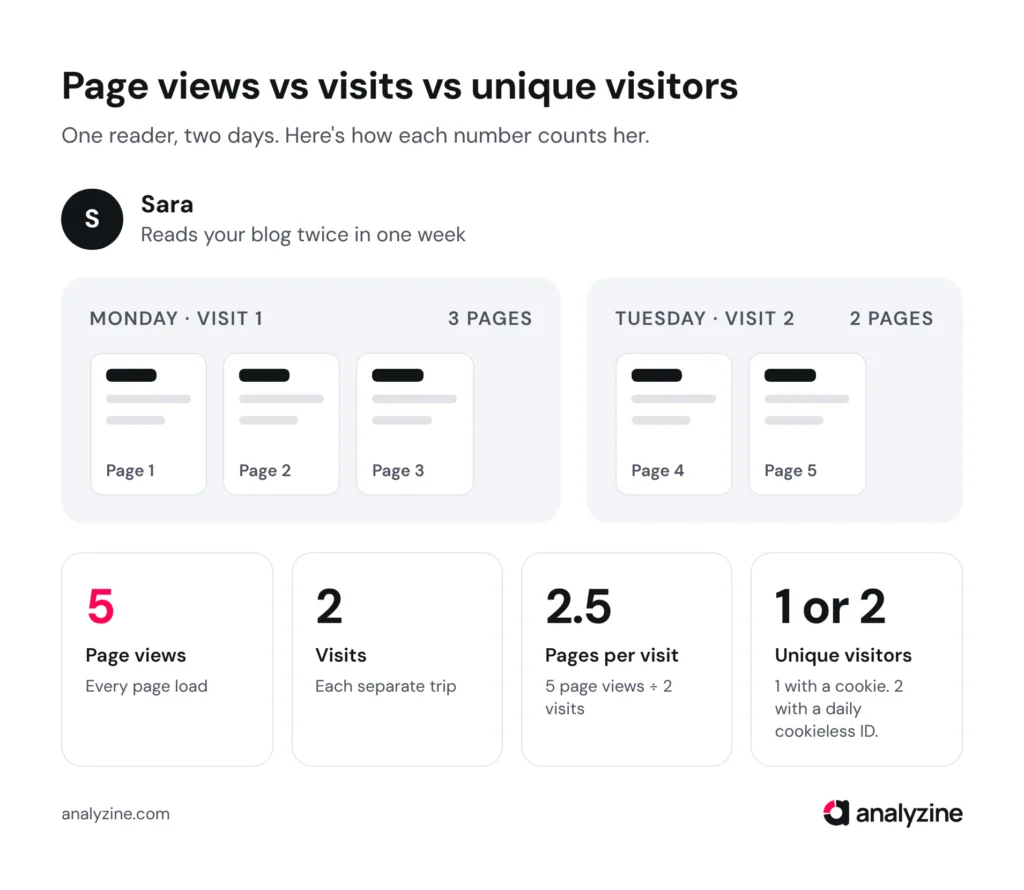
Sara finds your blog on Monday and reads 3 pages. She comes back on Tuesday and reads 2 more.
- Page views: 5
- Visits: 2
- Pages per visit: 2.5
- Unique visitors: 1 in most tools, because a cookie recognises her browser on Tuesday
A cookieless tool may count her differently. Some cookieless tools, including Analyzine’s cookieless mode, use a visitor ID that changes every day. That protects Sara’s privacy, but she shows up as 2 unique visitors across the 2 days.
How to count page views: 3 ways
1. Use an analytics tool
This is the most common way. You add a small tracking script to your site, and it records a page view each time a page loads in someone’s browser.
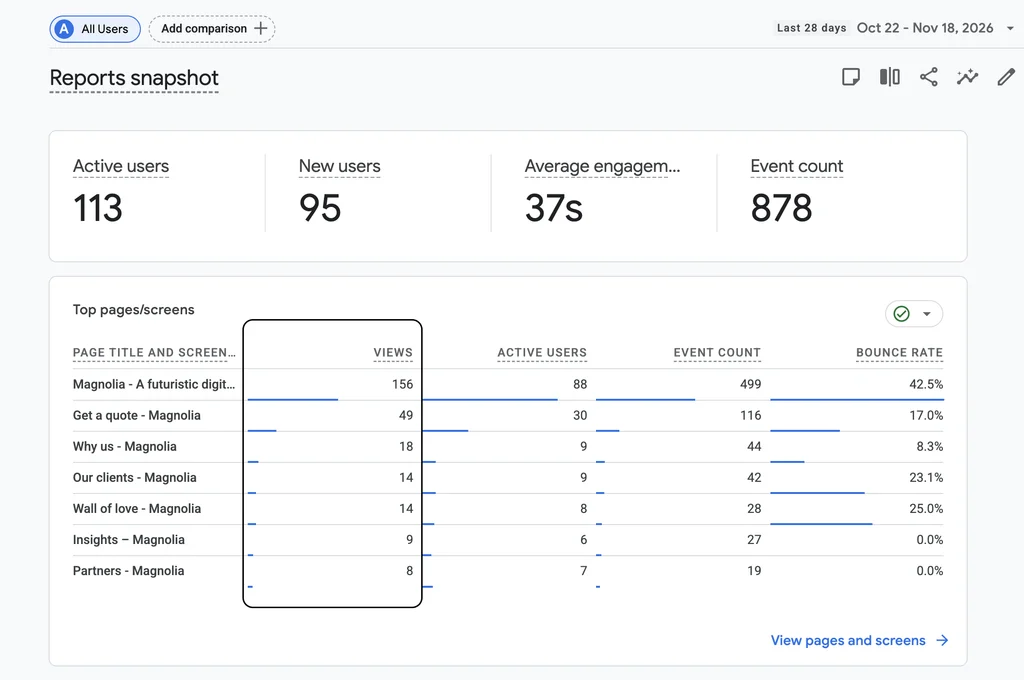
In Google Analytics 4, go to Reports, then Engagement, then Pages and screens. The Views column shows the page views for each page. Next to it you’ll see Active users, so you can compare page loads with people.
Adobe Analytics counts a page view each time its page tracking call runs. Clicks it tracks as links don’t count as page views, according to Adobe’s documentation.
- Good for: most sites. GA4 filters known bots, and the reports come ready-made.
- Watch out for: ad blockers and declined consent, which hide some visits.
2. Use a WordPress plugin
WordPress stats plugins show page views right inside your dashboard. Many keep the data in your own database, so visitor data stays on your site.
Check one thing before you trust the numbers: how the plugin counts. Some counters run in PHP while WordPress builds the page. If a caching plugin or your host serves a saved copy of the page, WordPress never runs, and that view goes uncounted.
Plugins that count with a small script in the browser avoid this problem. The script runs every time the page opens, cached or not.
- Good for: WordPress sites that want their numbers in wp-admin.
- Watch out for: PHP-only counters on sites with page caching.
3. Read your server logs
Your web server writes a line for every request it receives. Count the requests for real pages and you get a raw page view number.
Logs catch visitors that ad blockers hide. But they also include bots, plus requests for images, stylesheets and scripts. You need to filter all of that out before the number means anything.
Logs have one more blind spot. If a CDN such as Cloudflare serves a cached copy of your page, the request may never reach your server. So it never reaches your log either.
- Good for: technical checks and sites with no tracking script.
- Watch out for: bots, file requests and CDN caching.
Why your page view numbers don’t match
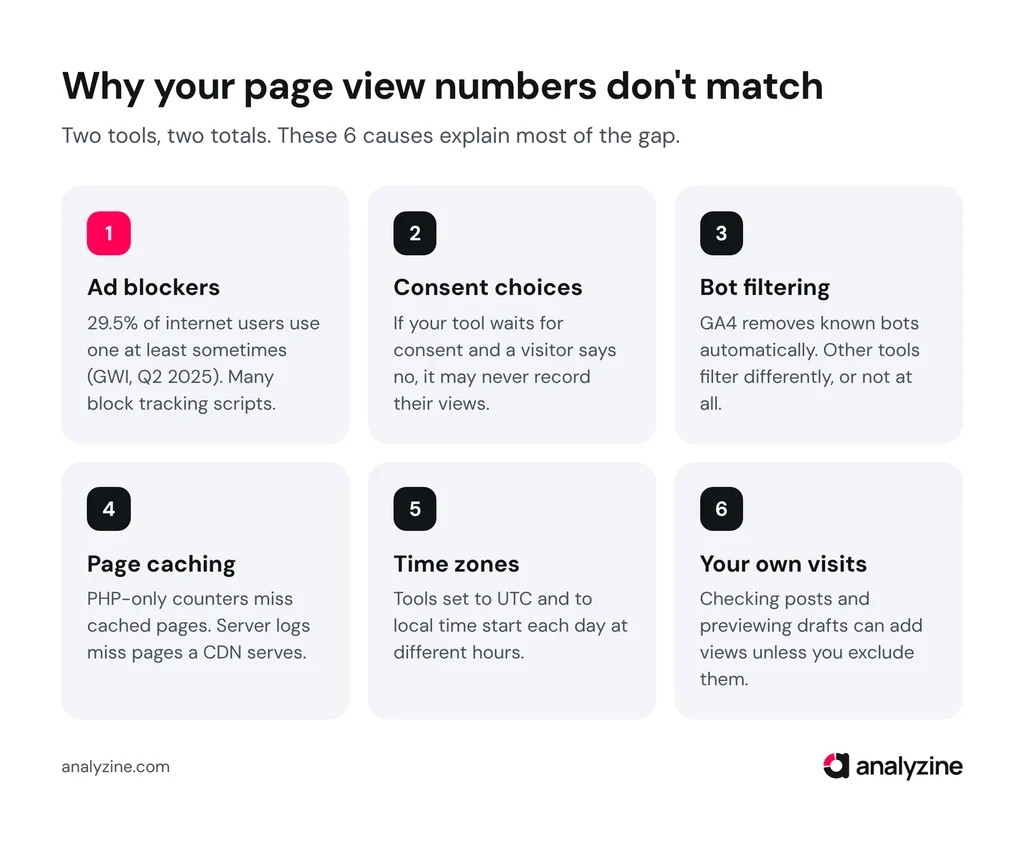
Say GA4 shows 8,200 page views last month and your plugin shows 9,100. Neither is broken. These 6 causes explain most gaps.
- Ad blockers. 29.5% of internet users worldwide use an ad blocker at least sometimes, according to GWI data from Q2 2025 (Backlinko). Many of these block common tracking scripts, so those views never reach your report.
- Consent choices. If your tool waits for consent and a visitor says no, the tool may never record their views.
- Bot filtering. GA4 removes known bots automatically. You can’t turn this off or see how much it removed (Google Analytics Help).
- Page caching. PHP-only counters miss pages served from cache. Server logs miss pages served by a CDN.
- Time zones. A tool set to UTC and a tool set to your local time start each day at different hours. Daily numbers drift apart as a result.
- Your own visits. Every time you check a post or preview a draft, some tools count it.
Run a quick page view check
Pick one day and one page. Then work through this list.
- [ ] Set every tool to the same time zone.
- [ ] Exclude your own team and logged-in admins.
- [ ] Compare page views only, not visits or visitors.
- [ ] Note whether each tool counts cached pages.
- [ ] Note whether each tool filters bots.
- [ ] Look at the gap. Small gaps are normal. A big gap usually points to blocking, consent, or caching.
How many page views does a website get?
There’s no fair average. A local plumber and a recipe blog live in different worlds, and public benchmarks lump them together.
Your own trend is the better yardstick. Compare this month with last month, and with the same month last year if your business is seasonal.
You can also work it out from visits. A site with 2,000 visits a month and 2.5 pages per visit gets about 5,000 page views a month. If pages per visit drops, people are reading less on each trip, so check the links between your related pages.
Page view analysis: what to do with the number
A page view count on its own doesn’t tell you much. It gets useful when you ask better questions.
- Which pages get the most views? These are your best-known pages. Make sure each one links to a clear next step.
- Which pages do people land on first? Landing pages make the first impression. A busy landing page with few clicks onward needs work.
- How many pages per visit? Low depth on a blog can mean weak internal links.
- Which pages did buyers read before they bought? This is the question that ties content to money.
Most page view reports stop before that last question. They tell you a page got 3,000 views. They don’t tell you whether any of those readers bought, booked, or signed up.
How Analyzine counts page views
Analyzine is a WordPress analytics plugin that follows each visitor from the first click to the conversion. It launches in early December.
- It counts page views with a small tracker that works with page caching.
- You can exclude bots, your own team, and preview visits.
- All the data stays in your WordPress database, and raw IP addresses are never stored.
- You choose cookie mode or cookieless mode. The Privacy Audit screen shows exactly what, if anything, leaves your server.
- The journey timeline shows the pages a person read before they bought, booked, or signed up.
Join the waitlist for early access and a launch discount.
FAQ
Does refreshing a page count as a page view?
Yes, in most tools. Google Analytics 4 sends a page view each time a page loads, so a reload adds one.
That’s why page views can climb faster than visitors. To see how many people viewed a page, look at users or unique visitors instead.
Do my own visits count as page views?
Usually, yes. Most tools count every page load unless you tell them to ignore certain people.
In GA4, you can filter out internal traffic by IP address. Many WordPress plugins let you exclude logged-in admins or certain user roles.
Where do I find page views in Google Analytics 4?
Go to Reports, then Engagement, then Pages and screens. The Views column shows the page views for each page.
You can change the date range at the top right and compare it with an earlier period.
What’s the difference between page views and unique page views?
Page views count every load of a page. Unique page views count each page once per visit, however many times it loaded.
Universal Analytics had a unique page views metric, but it stopped collecting data in July 2023. Google Analytics 4 doesn’t include it as a standard metric.
What’s a good number of pages per visit?
It depends on the site. A blog post that answers one question may get 1 page per visit and still do its job.
A store needs more, because shoppers have to see a product, a cart, and a checkout. Track your own number over time and watch for sudden drops.
The short version
To count page views on your website, pick one of 3 tools: an analytics tool, a WordPress plugin, or your server logs. Each counts a little differently, so check what yours includes before you trust a single number.
Then go one step further. Look at which pages people read before they bought, booked or signed up.
That’s the question Analyzine answers, right inside WordPress. Join the waitlist to get early access when it launches in early December.