
Quick answer
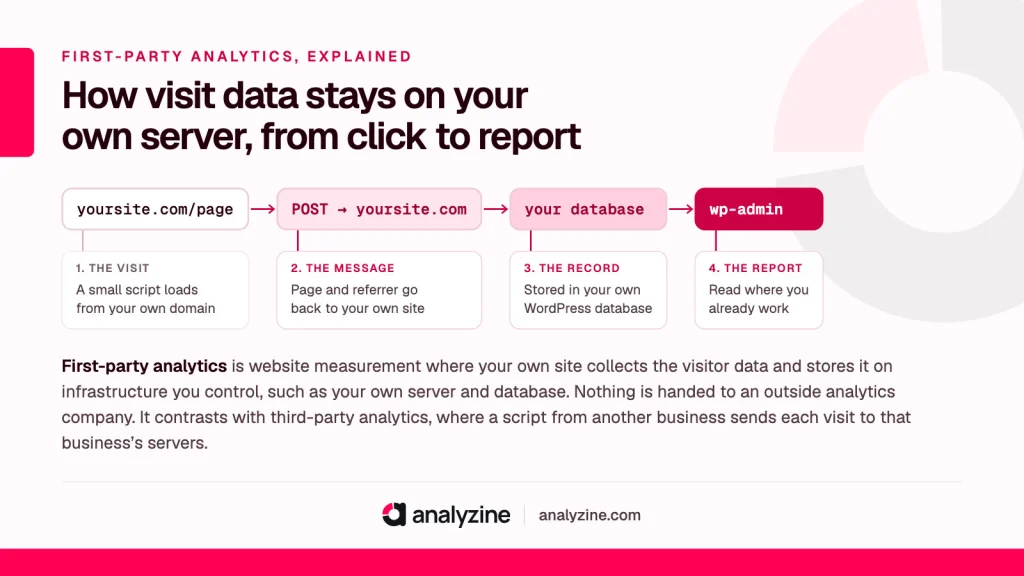
First-party analytics is website measurement where your own site collects the visitor data and stores it on infrastructure you control, such as your own server and database. Nothing is handed to an outside analytics company. It contrasts with third-party analytics, where a script from another business sends each visit to that business’s servers.
What first-party analytics means
It comes down to two questions: who collects the data, and where does it end up?
In a first-party setup, the answer to both is “you”. The tracking code runs from your own domain, the visit is recorded by your own server, and the numbers sit in a database you own. If you run a WooCommerce shop selling candles, the record that someone landed on your lavender candle page lives in your shop’s database, next to your orders.
In a third-party setup, a script from another company loads on your page. It sends details of each visit to that company’s servers, where the data is processed and stored. You look at the results through their dashboard, under their terms.
The word “party” here is just about who is who. You and your visitor are the first two parties. Anyone else involved, such as an analytics provider or an ad network, is a third party.
First-party vs third-party analytics
The difference is easier to see side by side.
| First-party analytics | Third-party analytics | |
|---|---|---|
| Who collects the data | Your website | An outside company’s script |
| Where it’s stored | Your server or database | The provider’s servers |
| Who can see raw data | You (and whoever you let in) | You, and the provider |
| Requests to outside domains | None needed | At least one per page view |
| Where you read reports | Inside your own system | The provider’s dashboard |
| Who does the processing | Your server | The provider |
Neither column is automatically good or bad. Third-party tools are popular because they’re free or cheap, easy to install, and the provider carries the storage and processing load. First-party tools give up some of that convenience in exchange for control.
First-party cookies and third-party cookies
Cookies follow the same logic, but the label is about the domain that sets the cookie, not about who gets the data.
- A first-party cookie is set by the domain in the visitor’s address bar. If someone is on yourstudio.co.uk, a cookie from yourstudio.co.uk is first-party.
- A third-party cookie is set by a different domain, usually through an embedded script, image or frame. Browsers have been restricting these for years.
This is where people get confused. A tool can set a first-party cookie on your domain and still send all the data to its own servers. So “uses first-party cookies” and “is first-party analytics” are not the same claim. The question that matters is where the data goes, not only what the cookie’s domain says.
A first-party setup doesn’t need cookies at all, either. Plenty of first-party tools count visits without storing anything in the browser. That’s covered in cookieless tracking.
How first-party data tracking works on a WordPress site
On WordPress, a first-party setup usually looks like this:
- A small script loads from your own domain as each page loads.
- The script sends a short message about the visit (the page, the referrer, perhaps screen size) back to your own site.
- A plugin on your site receives that message and writes it to your WordPress database.
- Reports are built from those tables and shown in wp-admin.
Say a yoga studio’s site gets 2,000 visits in a week. With a third-party tool, 2,000 sets of visit details travel to another company. With a first-party tool, those 2,000 records stay in the studio’s own database. The studio sees the same kind of information, but nobody else holds a copy.
Benefits of first-party analytics
You own the data
The visit records sit in your database, so you decide how long they’re kept, who can see them and when they’re deleted. If a visitor asks you to remove their data, you can find it and delete it yourself rather than raising a request with a provider. If you stop using the tool, the data hasn’t been left behind on someone else’s servers. This idea of keeping data under your own control is the subject of data sovereignty.
Fewer outside requests
Each third-party script means the visitor’s browser connects to another domain, often more than one. That’s another connection to set up and another server you’re relying on to respond quickly. A first-party tracker talks to the same domain the page came from. That tends to be lighter, and it means the visitor’s browser isn’t telling an outside company which pages they read.
Less exposure to data transfers
When visit data goes to a provider, you have to think about where that provider stores and processes it, which can involve other countries and their laws. When data stays on your own server, the picture is simpler. It doesn’t remove your duties under privacy law, since you still process personal data, but it does remove one party from the chain.
Ad blockers: an honest view
Many ad blockers and privacy extensions work from lists of known tracking domains and script names. Because a first-party script loads from your own domain, it often isn’t on those lists, so you may see more of your real traffic than a well-known third-party tool would report.
“Often” is the key word. Some blockers also match common file names or URL patterns, and some visitors block JavaScript entirely. No analytics tool is immune, first-party or not. And if a visitor has gone out of their way to block tracking, that’s a preference worth respecting rather than working around, the same thinking behind browser signals such as Do Not Track.
The trade-offs: your server does the work
Going first-party moves work from someone else’s infrastructure onto yours. That has real costs.
- Database growth. Every visit becomes rows in your database. A busy shop can build up a lot of data over a year. Retention settings that delete old records automatically matter here.
- Server load. Recording each visit means a small write on your server. On cheap shared hosting with a sudden traffic spike, that adds up. Good first-party tools keep the tracker small and the writes efficient, but the load is still yours.
- Backups and security. The data is in your database, so it’s in your backups, and protecting it is your job. Keep WordPress, plugins and hosting up to date.
- No outside benchmarks. Big third-party platforms can compare you with other sites. A first-party tool only knows about your site.
- Ad platform links. Third-party tools often plug straight into ad networks. If you rely on that, a first-party tool may not replace it.
For many small businesses, the trade is worth it. A course seller on LearnDash or a service business taking enquiries usually needs to know where visitors came from and what led to a sale, not to share audiences with an ad platform.
Where Analyzine fits
Analyzine is a privacy-first analytics plugin for WordPress built this way. Its reports live inside wp-admin, the data is stored in your own WordPress database in Analyzine’s own indexed tables, and visitor data is never sent to Solvix Studio or anyone else. It loads no third-party scripts, and the tracker is 5 KB or less and loads asynchronously, so it stays out of the way of your page. If server load is your main worry, there’s more detail on our performance page.
A practical first step
Before you switch tools, list every analytics and marketing script on your site and note where each one sends data. A browser’s developer tools will show you every outside domain a page contacts. Most site owners are surprised by the length of that list. Decide which of those you actually use, remove the rest, and you’ll have a clearer view of what a first-party tool would replace.
Frequently asked questions
Is Google Analytics first party or third party?
It’s a mix, which is why people find it confusing. Google Analytics sets cookies on your own domain, so those cookies are first-party. But the visit data is sent to Google’s servers and processed there, so in terms of who collects and holds the data, it’s a third-party service.
Are first-party trackers bad?
Not by nature. A first-party tracker that counts visits for the site owner and keeps the data on the site’s own server is very different from one built to follow people across the web. What matters is what the tracker collects, how long it’s kept and whether anyone else receives it.
How is first-party data collected?
On a website, it’s usually gathered by a small script on your own domain that reports each page view back to your own server, plus data people give you directly, such as orders, bookings and form entries. The defining feature is that it comes straight from your visitors to you, with no middleman.
Do ad blockers block first-party analytics?
Sometimes. Many blockers target known third-party tracking domains, so first-party scripts get through more often, but some blockers match common file names or paths too. Treat any analytics as a close estimate, not a perfect count.
Who owns first-party data?
In practice, the business that collects it controls it and is responsible for it. Under privacy laws such as the GDPR, the people the data is about still have rights over it, including asking to see it or have it deleted, so “owning” it comes with obligations.
