
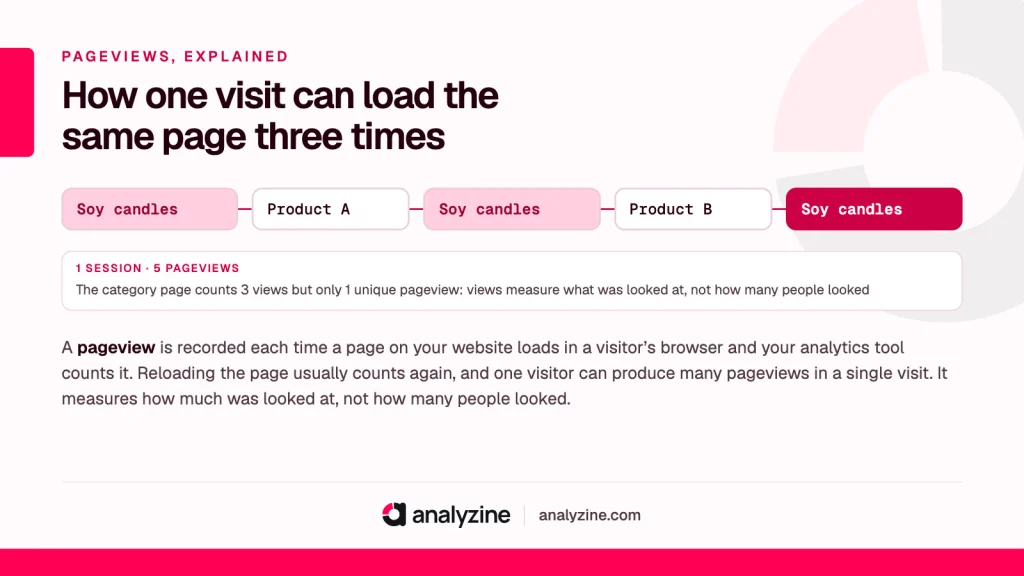
Quick answer
A pageview is recorded each time a page on your website loads in a visitor’s browser and your analytics tool counts it. Reloading the page usually counts again, and one visitor can produce many pageviews in a single visit. It measures how much was looked at, not how many people looked.
What counts as a pageview
A pageview is the simplest number in analytics. A page loads, the tracking script on it runs, and the tool adds one to the count. Your homepage, a product page, a blog post, the basket, the checkout: every load of every one counts once.
You’ll see it written as “pageview”, “page view” and “view”. They all mean the same thing. Analytics tools tend to use the single word.
Some things usually don’t count:
- Files opened directly, such as a PDF price list or an image, because there’s no tracking script inside them.
- Visitors whose browser blocks the tracker, or who decline consent with a cookie-based tool.
- Known bots, which good tools filter out, though some always get through.
- Pages fetched in the background that the visitor never actually sees, as long as the tracker is built to ignore them.
That last one matters more than it used to. Browsers can now load a page in advance, betting that you’re about to click a link. A careful tracker waits until the page is shown before it counts anything.
Reloads, back buttons and other edge cases
Reloads count. In most tools, refreshing a page records a second view. A customer who refreshes your WooCommerce order confirmation page twice to check their details produces three views for one order.
The back button depends. Sometimes the browser loads the previous page again, which counts. Sometimes it restores the page from memory without running scripts, which may not count, depending on the tool.
New tabs count. Someone browsing a candle shop who opens five products in five tabs creates five views, even if they only glance at two.
None of this is a fault. It’s a reminder that the count records a page loading, not a person reading.
Single-page apps and pages that change without reloading
Traditional websites load a fresh page for every click, and the tracker runs each time. Most WordPress sites still work this way, so every page load is counted without any fuss.
Single-page apps work differently. The browser loads one page, then swaps the content and updates the address bar as the visitor clicks around, without a full reload. If the tracker only runs on the first load, a visitor who looks at eight screens shows up as a single view. To count properly, the tracker has to notice each change of address.
This can turn up on WordPress too: on headless sites with a separate JavaScript front end, and with some themes and plugins that load content in place, such as shop filters, infinite scroll or step-by-step quizzes. For each one, decide whether a change should count as a new page. A shop filter that updates the product grid probably shouldn’t. A quiz moving to its results page probably should.
Pageviews vs unique pageviews vs sessions
These three are easy to confuse.
- Pageviews count every load of a page.
- Unique pageviews count the number of visits in which a page was seen at least once. Some tools, including the older version of Google Analytics, reported this. Not every tool does.
- Sessions count visits, whatever pages they included. More on that in session.
Say one visitor opens your “Soy candles” category page, clicks into a product, goes back to the category, clicks another product and goes back again. That’s 3 views of the category page, but only 1 unique pageview, inside 1 session. The gap between the two numbers tells you the category page is being used as a hub, which is exactly what you want it to be.
A related figure is pageviews per session, sometimes called pages per session:
Pages per session = page loads ÷ sessions
If 1,000 sessions produce 2,400 page loads, the average visit includes 2.4 pages. It’s a rough sign of how much people explore. On its own it can’t tell you whether that exploring was happy or frustrated.
And views are not people. A thousand views might come from one devoted fan or a thousand strangers. For people, look at unique visitors.
Why pageviews alone mislead
They’re easy to count and easy to grow, which is exactly why they can lead you astray.
Design choices change the number. Split a long article across four pages and views quadruple with no extra readers. Turn a gallery into one-image-per-page and the figure balloons.
More can be worse. A visitor who clicks through six pages hunting for your delivery costs racks up plenty of views and has a bad experience.
Fewer can be better. Someone who lands on your yoga studio’s class page, finds the time and books straight away has seen one page and had a perfect visit. Some tools would record that as a bounce, which shows how easily single-page visits get misread. See bounce rate.
Views don’t pay the bills. Picture a candle shop with two pages. A blog post about candle care gets 5,000 views a month and leads to 2 orders. A scent guide gets 600 and leads to 25. Rank pages by views and you’d put your effort into the wrong one. Rank them by the conversions they lead to and the answer flips.
Views measure attention. That’s useful, but attention is the start of the story, not the end of it.
How to use pageviews well on WordPress
- Compare a page with itself over time. If your shipping page suddenly gets twice its usual views, something upstream changed. Perhaps the checkout is confusing people.
- Look for pages with lots of views and no next step. A popular post with no link to a product, course or booking form is a missed chance.
- Check your top pages for surprises. If your 404 page or login page is near the top, you have broken links or a lot of bot traffic.
- Pair views with outcomes. Judge content by what it leads to, not by how often it loads.
Pageviews and privacy
Each view is an event, not a person. Counting that a page loaded doesn’t require knowing who loaded it, which makes this the least intrusive number in analytics. Privacy questions only start when a tool tries to link page loads together into visits and visitors, because that means recognising a browser again.
That’s why cookieless tracking can count page loads accurately while being more cautious about who’s who. If you only ever needed page counts, you’d need very little data at all. Most site owners want more than that, so it’s worth choosing a tool that collects what you’ll actually use and nothing extra.
Frequently asked questions
Does refreshing a page count as a pageview?
In most analytics tools, yes. Each reload runs the tracking script again, so it’s recorded as another view. That’s one reason the count runs higher than the number of people reading.
What is the difference between pageviews and unique pageviews?
The first counts every time a page loads. The second counts how many visits included that page at least once, so three views of the same page in one visit is 3 views but only 1 unique pageview. Not every tool reports the unique figure.
Are pageviews and sessions the same?
No. A session is one visit, and each view is one page loaded during it. A single session can contain one page load or dozens.
How many pageviews a month is good?
There’s no universal good number. It depends entirely on what your site is for: a news blog needs volume, while a local service business might do very well with a few hundred views a month if the right people book. Measure your own trend and what the views lead to.
How can I check pageviews on my WordPress site?
You need an analytics tool installed on the site, either a plugin or a script from an analytics service. Most show views per page and over time. Choose one that also shows what those visits led to, such as orders or bookings, so you’re not judging pages on views alone.
