
Quick answer
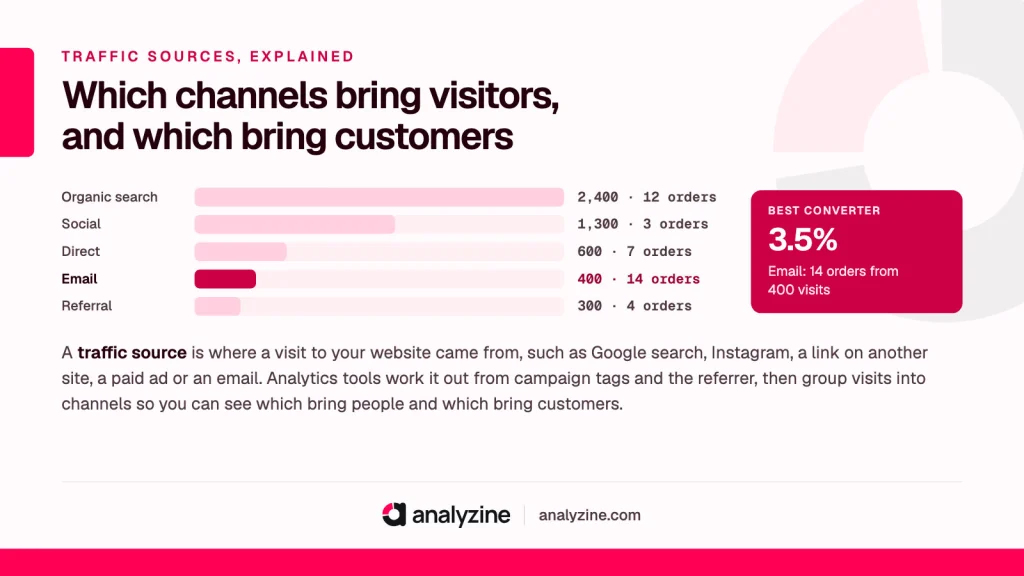
A traffic source is where a visit to your website came from, such as Google search, Instagram, a link on another site, a paid ad or an email. Analytics tools work it out from campaign tags and the referrer, then group visits into channels so you can see which bring people and which bring customers.
What the source of a visit tells you
Every visit to your site starts somewhere. Someone searched, tapped a post, clicked a link in an article, opened your newsletter or saw an ad. Your analytics tool records that starting point on the first page of the visit and keeps it as the visit’s source.
On its own, a single source is a trivia fact. Added up over a month, it’s one of the most practical numbers you have, because it shows where your time and money are actually paying off. A small business doesn’t have hours to spare on channels that bring nobody, or bring plenty of people who never buy.
The main types of traffic sources
Most tools sort visits into a handful of channels. Names differ slightly between tools, but the ideas are the same:
| Channel | What it is | Example sources |
|---|---|---|
| Organic search | Clicks on unpaid search results | Google, Bing, DuckDuckGo |
| Paid search | Clicks on search ads | Google Ads, Microsoft Advertising |
| Social | Clicks from social networks, unpaid | Facebook, Instagram, Pinterest, LinkedIn |
| Paid social | Clicks on social ads | Meta ads, TikTok ads |
| Referral | Clicks on links from other websites | Blogs, forums, directories |
| Clicks in newsletters and emails | Your mailing list, order emails | |
| Direct | No referrer and no tags, so the source is unknown | Typed URLs, bookmarks, untagged app links |
A few notes on the ones people misread most:
- Organic traffic is the long, slow channel built by being findable in search. It’s free per click but takes months of work.
- Referral traffic is anyone who arrives through a link on someone else’s site. It often brings the warmest visitors.
- Direct traffic isn’t really a source. It’s the pile where visits go when the source is missing, and it’s usually bigger than it should be.
- Paid and email visits are only reliably recognised when the links carry tags. Without them, a paid Facebook click can look like ordinary social, and a newsletter click can look like direct.
Source vs medium vs campaign
These three words appear in almost every analytics tool, and they’re easy to mix up.
- Source is the specific place: google, instagram, newsletter, a blog’s domain.
- Medium is the type of traffic: organic, cpc (paid clicks), social, referral, email.
- Campaign is the named effort the visit belongs to: spring-sale, black-friday, new-course-launch.
Put together, they read like a short sentence. “google / organic” is someone who found you in search results. “google / cpc” is someone who clicked your Google ad. “newsletter / email / spring-sale” is a reader who clicked the spring sale email.
A channel is simply a group of source and medium pairs. “Organic search” is every visit where the medium is organic, whichever search engine sent it. That’s why one channel can contain many sources.
How analytics decides the source
The tool checks for clues in a fixed order:
- Campaign tags first. If the landing page address carries UTM parameters, the tool trusts them. You wrote them, so they’re the most accurate clue.
- Ad click identifiers next. Ad platforms such as Google Ads can add their own click ID to the address, which tools linked to that platform recognise as paid.
- Then the referrer. If there are no tags, the tool reads the referrer and matches the domain against known search engines and social networks. Anything else becomes a referral.
- Nothing at all. No tags and no referrer means direct.
The practical lesson: the links you control (emails, ads, QR codes, social bios) should always carry tags. Everything else is left to the referrer, which is often trimmed or missing.
Traffic source analysis: a worked example
Here’s a made-up month for someone selling online courses through LearnDash.
| Channel | Visits | Enrolments | Conversion rate |
|---|---|---|---|
| Organic search | 2,400 | 12 | 0.5% |
| Social | 1,300 | 3 | 0.2% |
| Direct | 600 | 7 | 1.2% |
| 400 | 14 | 3.5% | |
| Referral | 300 | 4 | 1.3% |
Sorted by visits, social looks like the second most important channel. Sorted by enrolments, it’s the weakest. Email, with the fewest visitors bar one, brings the most enrolments. If the course seller spends six hours a week on Instagram and one hour on the newsletter, this table is a strong hint to rebalance.
Two cautions before acting on it. First, the conversion rate for direct is probably flattered by untagged email clicks, so tag the newsletter properly before drawing conclusions. Second, each row here credits the last source before the enrolment. Someone might find the course on Instagram, come back a week later through search and enrol from an email. Social did real work there and gets no credit.
That second point is why it helps to see whole visitor journeys as well as the final click. Analyzine shows every touchpoint from first visit to order and links each enrolment, booking or order back to the traffic source and campaign behind it, all inside wp-admin.
Why sources matter for a small business
Big companies have teams for each channel. You probably have yourself, a few spare hours and a modest budget. Knowing your sources helps you decide where those go.
- Time. If two hours of writing one useful blog post a month brings more customers than daily social posting, you’ve found a better use of your mornings.
- Money. For anything you pay for, compare what each paid source costs with the revenue it brings. Visits alone won’t tell you whether ads are worth it.
- Risk. If almost all your customers come from one source, a single change outside your control (a search update, a platform changing its rules) can hurt badly. Spreading across two or three healthy sources is safer.
- Seasonality. A wedding florist will see search behave very differently in January than in August. Compare like with like, month to month and year to year.
Mistakes to avoid
- Judging channels by visits. Look at orders, bookings and revenue per source as well.
- Tagging internal links. UTM tags on links between your own pages overwrite the visitor’s real source.
- Inconsistent names. “Facebook”, “facebook” and “fb” become three sources. Pick one spelling and write it down.
- Short date ranges. A week is too noisy for small sites. Look at a month or a quarter.
- Ignoring the direct share. If direct is unusually large, fix your tagging before trusting the rest.
A good first step this week: list every link you share regularly (newsletter, social bios, QR codes, partner sites), tag the ones you control, and check the channel report again in a month.
Frequently asked questions
What does traffic source mean?
It’s the place a visit came from before it reached your site, such as a search engine, a social network, another website, an email or an ad. Analytics tools record it from campaign tags or the referrer and group visits into channels like organic search, social, referral, email and direct.
How do I check my website’s traffic sources?
Open the acquisition or sources report in your analytics tool and look at visits by channel, then by source and medium. Add conversions or revenue next to each one so you can see value as well as volume. If you use a WordPress analytics plugin, this report usually sits on the main dashboard.
What is the difference between source and medium?
The source is the specific origin, such as google or newsletter. The medium is the type of traffic, such as organic, cpc, social or email. Together they describe a visit, for example “google / organic” for an unpaid search click.
Which traffic source is best for a small business?
There’s no single best one. Look at which source brings customers for the least time and money in your own reports. For many small sites a mix of search, email and a few good referral partners is steadier than relying on one platform.
Why is so much of my traffic labelled direct?
Usually because visits arrive without a referrer or tags, from email apps, chat apps, documents and QR codes. Only some of it is people typing your address. Tagging the links you share with UTM parameters moves much of it into the right channel.
